Deployment
How to add a game Part 6 (Deployment Specs)
Once everything is pre-configured, containers with all their configuration must be deployed.
Deployment Specifications
The Deployment Spec is the configuration and instruction set for a game that Kubernetes follows when deploying servers. each Deployment Spec configuration is separated into 4 main sections and some less important sections.
Basic Information
Spec name: Name shown for the setting up of a server. Used as a descriptive name for the spec.
Resource Type: Select one of the two types: Standard or Agones. Deployment Standard is the recommended option. Agones may or may not be selectable, depending on your account.
Strategy Type: The default and locked strategy is "Recreate". Recreate stops all pods before starting new ones and it's required for game servers not to encounter port conflicts. For different strategies, please contact support.
Default Replicas: Server pods can have a set number of replicas configured on each server deployment. Default is set to 1 and locked; on value 1 each game server pod is a single server instance. Note that replicas are managed per-server, not at the deployment spec level. To change the replicas values, please contact support.
Termination Grace Period: The time allowed for graceful shutdown before force-killing the pod; it's measured in seconds. We recommend higher than 180 for game servers to guarantee save data and progress to be saved.
Container Selection
All containers (Main, init and sidecar) for the game are listed with their respective images here.
Game Branch & Template Set Selection
It shows an overview of the selection and discloses the number of variables and their type. Game branch and template set are immutable and cannot be changed after creation.
Port Mapping
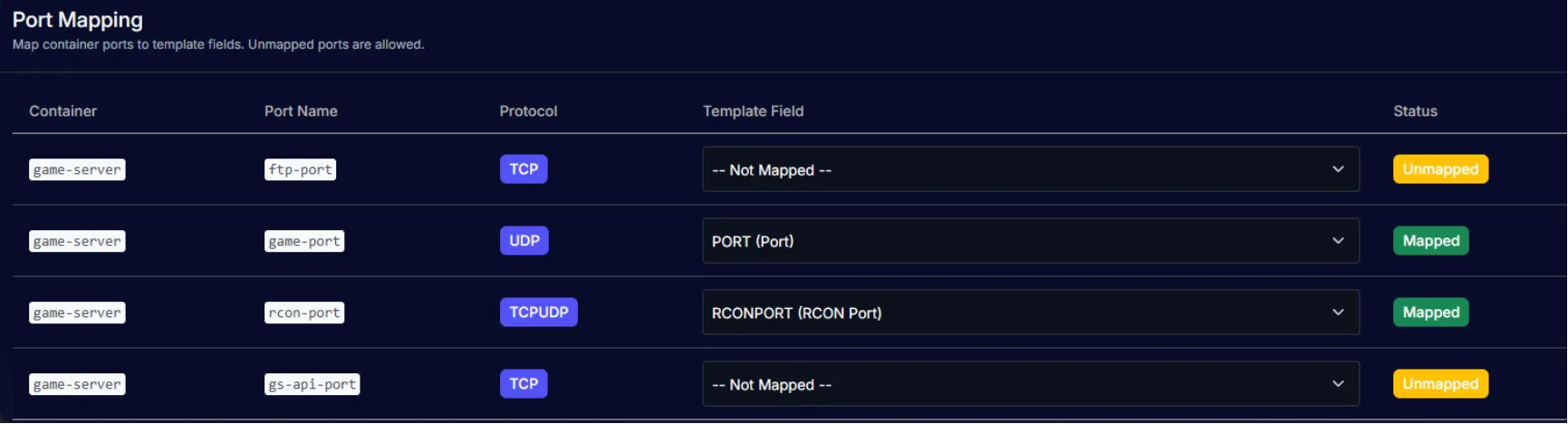
Container ports can be mapped to template fields in this section. Ports are variables set in the Template sets for the game. Each port can be mapped or unmapped, depending on needs. Unmapped ports will not be exposed or allocated by the Kubernetes controller. This is useful for internal ports that don't need external access.
Node Selector
Shows the platform selected on the container, just for reference only to ensure pods are scheduled on the correct OS nodes. Platform OS must be set in game configuration.
Pod Labels
Labels useful for grouping or tagging pods at Kubernetes level. Labels are keys and value pairs to organize and select pods. They can be set on type, region, version, etc. For visibility and sorting, mostly.
Pod Annotations
Similar to Pod Labels, Pod Annotations are non-identifying metadata stored for pods at Kubernetes level. They are useful for configuration tips and hints, monitoring settings, preventing auto-scaling eviction of active game servers, etc.
YAML Preview and Validation
A preview on the Kubernetes YAML config file can be generated and previewed in this section. This YAML is the instruction for Kubernetes to deploy your servers according to the entire configuration. This is the last configuration step.
To generate a YAML file a Location, Environment (Production, Development, Staging or Testing) and a Deployment Spec Test Parameters must be set. The preview has shortcuts to copy, download it or validate it with a Controller. Validation is instant and quickly checks if it's a valid configuration or if it needs fixing; it also lists the number of PVCs, Containers, Ports and Warnings.

Verification also shows requests sent to and from the Controller in raw text for analyzing.
Once the verification is successful, the game is ready to be deployed into servers from Hosting > Deployments (/deployments), or from Deploy Game Servers in the Quick Actions card on the game's overview.